PlateTrack 集成了目标检测、车牌识别和视频处理等一系列任务,有以下几个流程:
-
🚗 对道路中的车辆进行二次车牌检测
-
📝 使用 OCR 技术识别车牌号码:自动补全省份信息,过滤无效识别结果,完美支持中文车牌显示
-
📹 生成带有识别结果的标注视频
-
📊 输出详细的检测数据文件
项目结构如下:
PlateTrack/
├── src/
│   ├── plate_track.py          # 主程序文件
│   ├── config.py               # 配置文件
│   └── utils.py                # 工具函数
├── models/
│   ├── vehicle_detector.pt     # 车辆检测模型
│   └── license_plate_detector.pt # 车牌检测模型
├── data/
│   ├── input_videos/           # 输入视频
│   ├── output_videos/          # 输出视频
│   └── detection_results/      # 检测结果
├── docs/
│   └── README.md
├── requirements.txt
└── run_demo.py                 # 演示脚本
快速开始:
- 克隆项目
git clone https://github.com/username/PlateTrack.git
cd PlateTrack
- 安装依赖与python包
pip install -r requirements.txt- 自定义配置
修改 config.py 中的配置参数如下:
# 输入检测的视频或图像序列
IMAGES_DIR = './data/input_videos/images-2'
# 输入图像序列或视频的车辆目标检测结果
FULL_DETECTION_TXT_PATH = './data/input_videos/images-2.txt'
# 车牌检测权重
PLATE_DETECTION_MODEL_PATH = './models/license_plate_detector.pt'
# 输出车牌检测视频
OUTPUT_VIDEO_PATH = './data/output_videos/output_traffic_video.mp4'
# 输出车牌检测标签文件
OUTPUT_TXT_PATH = './data/detection_results/images-car-plate-final.txt'
# 需要进行车牌二次检测的车辆类别,包括汽车、面包车、卡车、公交
VEHICLE_CLASSES = ['Car', 'Van', 'Truck', 'Bus']
# 首字补全,在第一个汉字识别效果不佳或者无法识别的时候,自动补全车牌号第一个汉字区号
DEFAULT_PROVINCE = '苏'
- 代码思路: 图像预处理
该函数主要处理车牌图像,OCR在识别文字的时候会有图像的尺寸要求,这个函数将不符合尺寸的车牌放大处理,同时加入了对比度调整、锐化、去噪等操作,使图像更加清晰
def preprocess_plate_image(plate_img):
    """车牌的预处理:放大、对比度、锐化、去噪"""
    if plate_img is None or plate_img.size == 0:
        return plate_img
    # 创建输入图像的拷贝
    processed = plate_img.copy()
    # 获取图像的高度、宽度信息
    h, w = processed.shape[:2]
    # 放大小车牌,目标至少150x40
    if w < 150 or h < 40:
        scale_w = max(150 / w, 1.0)
        scale_h = max(40 / h, 1.0)
        # 额外放大两倍确保清晰
        scale = max(scale_w, scale_h) * 2.0
        new_w = int(w * scale)
        new_h = int(h * scale)
        # 三次插值算法放大
        processed = cv2.resize(processed, (new_w, new_h), interpolation=cv2.INTER_CUBIC)
    # 对比度增强与轻微锐化、去噪
    # 像素值 = alpha × 原像素值 + beta,其中 alpha 控制对比度,beta 控制亮度
    processed = cv2.convertScaleAbs(processed, alpha=1.5, beta=20)
    # 图像锐化,增强边缘和细节
    kernel = np.array([[-1, -1, -1], [-1, 9, -1], [-1, -1, -1]])
    processed = cv2.filter2D(processed, -1, kernel)
    # 图像轻微去噪,使用双边滤波函数,在去噪的同时保持图像边缘清晰
    processed = cv2.bilateralFilter(processed, 5, 50, 50)
    return processed
- 使用PaddleOCR进行车牌识别
OCR初始化
# 导入OCR
from PIL import Image, ImageDraw, ImageFont
# ---------- 初始化 OCR ----------
try:
    ocr = PaddleOCR(
        lang='ch', # 支持中英文识别
        use_doc_orientation_classify=False,
        use_doc_unwarping=False,
        text_det_limit_side_len=64
    )
    print("PaddleOCR 初始化成功")
except Exception as e:
    print(f"PaddleOCR 初始化失败,请检查安装: {e}")
    ocr = None
OCR识别,输入裁剪处理后的车牌图像输出车牌号文本
def recognize_license_plate(license_plate_image: np.ndarray, save_debug_path: str = None) -> str:
    """
    对单个车牌图像执行预处理 + OCR + 后处理(自动补首字、过滤非车牌)
    返回识别出的车牌字符串(或空字符串)
    """
    if ocr is None or license_plate_image is None or license_plate_image.size == 0:
        return ""

    # 预处理
    processed = preprocess_plate_image(license_plate_image)

    # # 调试图像
    # if save_debug_path:
    #     cv2.imwrite(save_debug_path, license_plate_image)
    #     cv2.imwrite(save_debug_path.replace('.jpg', '_proc.jpg'), processed)

    try:
        # PaddleOCR
        result = ocr.predict(processed,
                             use_doc_orientation_classify=False, # 禁用文档方向分类
                             use_doc_unwarping=False, # 禁用文档弯曲校正
                             use_textline_orientation=False, # 禁用文本行方向检测
                             text_det_thresh=0.3, # 文本检测置信度阈值
                             text_det_box_thresh=0.5, # 文本检测框置信度阈值
                             text_rec_score_thresh=0.3) # 文本识别置信度阈值

        # result是list(dict)
        # 遍历检测到的文本区域,按score降序优先使用高置信度结果
        candidates = []
        if result and len(result) > 0:
            item = result[0]
            # PaddleOCR返回rec_texts/rec_scores
            if 'rec_texts' in item and item['rec_texts']:
                texts = item['rec_texts']
                # 获取置信度
                scores = item.get('rec_scores', [1.0] * len(texts))
                for t, s in zip(texts, scores):
                    # 文本和置信度配对
                    candidates.append((t, float(s)))
            else:
                # 老格式:每个element里包含text/score
                for r in result:
                    if isinstance(r, dict) and 'text' in r and 'score' in r:
                        candidates.append((r['text'], float(r['score'])))

        # 按元组的第二个元素(置信度)降序排序
        candidates = sorted(candidates, key=lambda x: x[1], reverse=True)

        for text, score in candidates:
            if not text or score < 0.25:
                continue
            # 去空格和分隔符
            cleaned = text.strip().replace(' ', '').replace('-', '').replace('·', '').replace('.', '')
            # 常见OCR错误替换
            cleaned = cleaned.replace('O', '0').replace('I', '1').replace('l', '1').replace('Z', '2').replace('S', '5').replace('B', '8').replace('0', 'D')
            # 若首字不是中文则自动补省份(Unicode范围)
            if not ('\u4e00' <= cleaned[0] <= '\u9fff'):
                cleaned = DEFAULT_PROVINCE + cleaned
            # 统一转成字母大写
            cleaned = cleaned.upper()
            # 过滤非车牌内容,将路上的广告牌、标志牌常见字样过滤掉,比如禁止、减速等
            if not is_valid_plate(cleaned):
                # 如果被过滤,继续尝试下一个候选项
                continue

            return cleaned # 返回有效的车牌字符串

    except Exception as e:
        print(f"OCR 识别异常: {e}")

    return ""
- 使用opencv和PIL绘制编码视频
# putText函数只能绘制英文
# 所以需要将cv图片转换为PIL格式
# cv2的颜色模式为BGR,PIL的颜色格式为RGB
# --- 绘制框与标签 ---
# BGR格式
            if obj_class in VEHICLE_CLASSES:
                color = (84, 218, 250)
            elif obj_class == 'Pedestrian':
                color = (195, 202, 129)
            else:
                color = (94, 111, 229)
            # 绘制矩形框
            cv2.rectangle(frame_to_draw, (x1_obj, y1_obj), (x2_obj, y2_obj), color, 2)
            # 主标签绘制(类型和ID)
            label_text = f"{obj_class}{obj_id}"
            # 绘制主标签背景与文本
            (text_w, text_h), baseline = cv2.getTextSize(label_text, cv2.FONT_HERSHEY_SIMPLEX, 0.6, 2)
            cv2.rectangle(frame_to_draw,
                        (x1_obj, max(0, y1_obj - text_h - baseline - 5)),
                        (x1_obj + text_w, y1_obj),
                        color, -1)
            cv2.putText(frame_to_draw, label_text, (x1_obj, max(0, y1_obj - baseline - 5)),
                        cv2.FONT_HERSHEY_SIMPLEX, 0.6, (255, 255, 255), 2)
            # 如果有车牌号,在车辆框下方单独显示
            if plate_text:
                plate_color = (27, 55, 121)
                # 支持中文
                try:
                    # 将OpenCV图像转换为PIL图像
                    pil_img = Image.fromarray(cv2.cvtColor(frame_to_draw, cv2.COLOR_BGR2RGB))
                    draw = ImageDraw.Draw(pil_img)
                    # 加载中文字体
                    font_path = "/home/kemove/devdata1/zrl/MOT/ByteTrack/ultralytics/SIMHEI.TTF"  # 黑体字体文件,可以从系统字体目录获取或下载
                    font_size = 25
                    font = ImageFont.truetype(font_path, font_size)
                    # 计算车牌文本位置(车辆框下方)
                    plate_label = f"{plate_text}"
                    bbox = draw.textbbox((0, 0), plate_label, font=font)
                    text_width = bbox[2] - bbox[0]
                    text_height = bbox[3] - bbox[1]
                    # 计算背景矩形位置
                    bg_x1 = x1_obj
                    bg_y1 = y2_obj + 5
                    bg_x2 = x1_obj + text_width + 10
                    bg_y2 = y2_obj + 5 + text_height + 10
                    # 绘制背景矩形
                    draw.rectangle([bg_x1, bg_y1, bg_x2, bg_y2], fill=plate_color)
                    # 绘制车牌文本
                    draw.text((bg_x1 + 5, bg_y1 + 5), plate_label, font=font, fill=(255, 255, 255))
                    # 将PIL图像转换回OpenCV格式
                    frame_to_draw = cv2.cvtColor(np.array(pil_img), cv2.COLOR_RGB2BGR)
- 图像坐标、车辆坐标以及车牌坐标的转换
首先这里有一个辅助函数wh_to_xyxy,目标检测的标签给出的格式为(x,y,w,h)分别代表检测框的左上x,左上y,宽度w,高度h,需要用函数wh_to_xyxy将其转换为(x1,y1,x2,y2)代表左上x,左上y,右下x,右下y
# ---------- 辅助函数 ----------
def wh_to_xyxy(x, y, w, h):
    """将 (x,y,w,h) 转为 (x1,y1,x2,y2)"""
    return int(x), int(y), int(x + w), int(y + h)
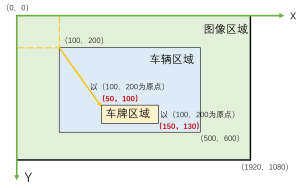
(1)车牌检测结果的相对坐标处理
- 相对坐标指的是相对于裁剪后车辆图像的车牌的坐标
- 车牌检测是在cropped裁剪后的车辆图像上进行的,所以检测到的车牌的坐标是相对于这个裁剪区域的
简单示意图如下:
if plate_results and len(plate_results[0].boxes) > 0:
    for box in plate_results[0].boxes:
        coords = box.xyxy.cpu().numpy()[0]
        conf = float(box.conf.cpu().numpy()[0])
        # 获取车牌相对于车辆检测结果的相对坐标x1_rel, y1_rel, x2_rel, y2_rel
        x1_rel, y1_rel, x2_rel, y2_rel = map(int, coords)
        w_rel = max(1, x2_rel - x1_rel)
        h_rel = max(1, y2_rel - y1_rel)
        ar = w_rel / h_rel
假设:
- 原图尺寸:1920×1080
- 车辆在原图中的位置:x1_obj=100, y1_obj=200, x2_obj=500, y2_obj=600
- 车牌在裁剪图像中的检测位置:x1_rel=50, y1_rel=100, x2_rel=150, y2_rel=130
(2)相对坐标转绝对坐标
x1_abs = x1_rel + x1_crop
y1_abs = y1_rel + y1_crop
x2_abs = x2_rel + x2_crop
y2_abs = y2_rel + y2_crop
- 裁剪区域:从原图的(100,200)到(500,600),尺寸400×400
- 车牌在裁剪图像中的位置:(50,100)到(150,130)
由此计算出车牌在整个图像坐标系的绝对坐标,不再以车辆的范围(100,200)为原点,而是以(0,0)为绝对坐标的原点,可得绝对坐标x1_abs、y1_abs、x2_abs、y2_abs:
- x1_abs = 50 + 100 = 150 (车牌左上角在原图中的x坐标)
- y1_abs = 100 + 200 = 300 (车牌左上角在原图中的y坐标)
- x2_abs = 150 + 100 = 250 (车牌右下角在原图中的x坐标)
- y2_abs = 130 + 200 = 330 (车牌右下角在原图中的y坐标)
(3)坐标扩展和最终裁剪
expand = 2
y1c = max(0, y1_abs - expand)
x1c = max(0, x1_abs - expand)
y2c = min(H, y2_abs + expand)
x2c = min(W, x2_abs + expand)
plate_img = frame[y1c:y2c, x1c:x2c]
- 车牌检测框可能裁剪得太紧,边缘字符可能被截断
- 扩展2个像素可以确保完整包含车牌字符,计算过程如下:
- y1c = max(0, 300 - 2) = 298 (扩展后的上边界)
- x1c = max(0, 150 - 2) = 148 (扩展后的左边界)
- y2c = min(1080, 330 + 2) = 332(扩展后的下边界)
- x2c = min(1920, 250 + 2) = 252(扩展后的右边界)
其中max和min函数是边界保护:
- max(0, ...):确保不会出现负坐标(超出图像左边界或上边界)
- min(W, ...) 和 min(H, ...):确保不会超出图像右边界或下边界
- 主要算法流程
# ---------- 主流程 ----------
def main():
    # 验证路径
    if not os.path.exists(IMAGES_DIR):
        print(f"图像目录不存在: {IMAGES_DIR}")
        return
    if not os.path.exists(FULL_DETECTION_TXT_PATH):
        print(f"检测结果 TXT 不存在: {FULL_DETECTION_TXT_PATH}")
        return

    # 加载检测结果 TXT
    try:
        df = pd.read_csv(
            FULL_DETECTION_TXT_PATH,
            sep=',',
            header=None,
            names=['frame_name', 'class', 'id', 'x', 'y', 'w', 'h']
        )
        print(f"加载检测记录数: {len(df)}")
    except Exception as e:
        print(f"读取 TXT 失败: {e}")
        return

    # 加载车牌检测模型
    try:
        plate_model = YOLO(PLATE_DETECTION_MODEL_PATH)
        print("车牌检测模型加载成功")
    except Exception as e:
        print(f"加载车牌检测模型失败: {e}")
        return

    # 视频写入器准备
    frame_names = sorted([f for f in os.listdir(IMAGES_DIR) if os.path.isfile(os.path.join(IMAGES_DIR, f))])
    if not frame_names:
        print("图像文件夹为空")
        return

    first_frame = cv2.imread(os.path.join(IMAGES_DIR, frame_names[0]))
    if first_frame is None:
        print("无法读取首帧")
        return
    H, W = first_frame.shape[:2]
    FPS = 10
    fourcc = cv2.VideoWriter_fourcc(*'mp4v')
    video_writer = cv2.VideoWriter(OUTPUT_VIDEO_PATH, fourcc, FPS, (W, H))

    final_lines = []

    # 创建进度条
    print("开始处理视频帧...")
    progress_bar = tqdm(total=len(frame_names), desc="处理进度", unit="帧", ncols=100)

    # 统计信息
    total_vehicles = 0
    plates_detected = 0

    # 遍历每帧
    for frame_name in frame_names:
        frame_path = os.path.join(IMAGES_DIR, frame_name)
        frame = cv2.imread(frame_path)
        if frame is None:
            progress_bar.update(1)
            continue

        frame_to_draw = frame.copy()
        current_df = df[df['frame_name'] == frame_name]

        for _, row in current_df.iterrows():
            obj_x, obj_y, obj_w, obj_h = row['x'], row['y'], row['w'], row['h']
            obj_id = row['id']
            obj_class = row['class']
            x1_obj, y1_obj, x2_obj, y2_obj = wh_to_xyxy(obj_x, obj_y, obj_w, obj_h)

            plate_text = ""
            best_plate_box_abs = None

            # 仅对车辆类别进行车牌检测 + OCR
            if obj_class in VEHICLE_CLASSES:
                total_vehicles += 1

                # 裁剪车辆 ROI
                x1_crop = max(0, x1_obj)
                y1_crop = max(0, y1_obj)
                x2_crop = min(W, x2_obj)
                y2_crop = min(H, y2_obj)
                cropped = frame[y1_crop:y2_crop, x1_crop:x2_crop]
                if cropped is not None and cropped.size > 0:
                    # 在裁剪区域运行车牌检测(返回可能多个框)
                    plate_results = plate_model(cropped, conf=0.1, verbose=False)

                    # 解析候选框并做筛选
                    candidate_boxes = []
                    if plate_results and len(plate_results[0].boxes) > 0:
                        for box in plate_results[0].boxes:
                            # xyxy, conf
                            coords = box.xyxy.cpu().numpy()[0]
                            conf = float(box.conf.cpu().numpy()[0])
                            x1_rel, y1_rel, x2_rel, y2_rel = map(int, coords)
                            w_rel = max(1, x2_rel - x1_rel)
                            h_rel = max(1, y2_rel - y1_rel)
                            ar = w_rel / h_rel

                            # 过滤候选:置信度、长宽比、位置(车牌一般在车辆下半部)
                            if conf < 0.35:
                                continue
                            if ar < 2.0 or ar > 8.0:
                                continue
                            if y1_rel < (cropped.shape[0] * 0.5):  # 上半部丢弃
                                continue

                            candidate_boxes.append((x1_rel, y1_rel, x2_rel, y2_rel, conf))

                    # 若有候选框,按置信度从高到低尝试 OCR
                    if candidate_boxes:
                        candidate_boxes = sorted(candidate_boxes, key=lambda x: x[4], reverse=True)
                        for i, (x1_rel, y1_rel, x2_rel, y2_rel, conf) in enumerate(candidate_boxes):
                            # 映射回原图坐标
                            x1_abs = x1_rel + x1_crop
                            y1_abs = y1_rel + y1_crop
                            x2_abs = x2_rel + x2_crop
                            y2_abs = y2_rel + y2_crop

                            # 适当扩展一点像素避免切得太紧
                            expand = 2
                            y1c = max(0, y1_abs - expand)
                            x1c = max(0, x1_abs - expand)
                            y2c = min(H, y2_abs + expand)
                            x2c = min(W, x2_abs + expand)
                            plate_img = frame[y1c:y2c, x1c:x2c]

                            if plate_img is None or plate_img.size == 0:
                                continue

                            debug_save = os.path.join(DEBUG_OUTPUT_DIR, f"plate_{frame_name.split('.')[0]}_{obj_id}_{i}.jpg")
                            plate_rec = recognize_license_plate(plate_img, save_debug_path=debug_save)

                            if plate_rec:
                                plate_text = plate_rec
                                best_plate_box_abs = [x1_abs, y1_abs, x2_abs, y2_abs]
                                plates_detected += 1
                                break  # 找到一个可信的就可以停止尝试

            # 记录 TXT 行(无论是否识别到车牌都记录)
            original_line = f"{frame_name},{obj_class},{obj_id},{obj_x},{obj_y},{obj_w},{obj_h}"
            final_lines.append(f"{original_line},{plate_text}\n")

            # --- 绘制框与标签 ---
            # BGR格式
            if obj_class in VEHICLE_CLASSES:
                color = (84, 218, 250)
            elif obj_class == 'Pedestrian':
                color = (195, 202, 129)
            else:
                color = (94, 111, 229)
            # color = (94, 111, 229) if obj_class in VEHICLE_CLASSES elif obj_class is Pedestrian (133, 150, 241)
            cv2.rectangle(frame_to_draw, (x1_obj, y1_obj), (x2_obj, y2_obj), color, 2)

            # 主标签(类型和ID)
            label_text = f"{obj_class}{obj_id}"
            # if plate_text:
            #     label_text += f"|PLATE:{plate_text}"

            # 绘制主标签背景与文本
            (text_w, text_h), baseline = cv2.getTextSize(label_text, cv2.FONT_HERSHEY_SIMPLEX, 0.6, 2)
            cv2.rectangle(frame_to_draw,
                        (x1_obj, max(0, y1_obj - text_h - baseline - 5)),
                        (x1_obj + text_w, y1_obj),
                        color, -1)
            cv2.putText(frame_to_draw, label_text, (x1_obj, max(0, y1_obj - baseline - 5)),
                        cv2.FONT_HERSHEY_SIMPLEX, 0.6, (255, 255, 255), 2)

            # 如果有车牌号,在车辆框下方单独显示
            if plate_text:
                plate_color = (27, 55, 121)

                # 支持中文
                try:

                    # 将OpenCV图像转换为PIL图像
                    pil_img = Image.fromarray(cv2.cvtColor(frame_to_draw, cv2.COLOR_BGR2RGB))
                    draw = ImageDraw.Draw(pil_img)

                    # 加载中文字体
                    font_path = "./SIMHEI.TTF"  # 黑体字体文件,可以从系统字体目录获取或下载
                    font_size = 25
                    font = ImageFont.truetype(font_path, font_size)

                    # 计算车牌文本位置(车辆框下方)
                    plate_label = f"{plate_text}"
                    bbox = draw.textbbox((0, 0), plate_label, font=font)
                    text_width = bbox[2] - bbox[0]
                    text_height = bbox[3] - bbox[1]

                    # 计算背景矩形位置
                    bg_x1 = x1_obj
                    bg_y1 = y2_obj + 5
                    bg_x2 = x1_obj + text_width + 10
                    bg_y2 = y2_obj + 5 + text_height + 10

                    # 绘制背景矩形
                    draw.rectangle([bg_x1, bg_y1, bg_x2, bg_y2], fill=plate_color)

                    # 绘制车牌文本
                    draw.text((bg_x1 + 5, bg_y1 + 5), plate_label, font=font, fill=(255, 255, 255))

                    # 将PIL图像转换回OpenCV格式
                    frame_to_draw = cv2.cvtColor(np.array(pil_img), cv2.COLOR_RGB2BGR)

                except ImportError:
                    # 如果PIL不可用,回退到OpenCV(不支持中文)
                    print("PIL未安装,中文显示不正常,请安装: pip install Pillow")

                    plate_label = f"PLATE:{plate_text}"
                    (text_w_plate, text_h_plate), baseline_plate = cv2.getTextSize(plate_label, cv2.FONT_HERSHEY_SIMPLEX, 0.6, 2)

                    # 绘制车牌背景
                    cv2.rectangle(frame_to_draw,
                                (x1_obj, y2_obj + 5),
                                (x1_obj + text_w_plate, y2_obj + 5 + text_h_plate + baseline_plate + 5),
                                plate_color, -1)

                    # 绘制车牌文本
                    cv2.putText(frame_to_draw, plate_label,
                                (x1_obj, y2_obj + 5 + text_h_plate + baseline_plate),
                                cv2.FONT_HERSHEY_SIMPLEX, 0.6, (255, 255, 255), 2)

        # 写入视频帧
        video_writer.write(frame_to_draw)

        # 更新进度条
        progress_bar.update(1)
        progress_bar.set_postfix({
            '车辆数': total_vehicles,
            '车牌识别': plates_detected,
            '识别率': f"{plates_detected/max(total_vehicles,1)*100:.1f}%"
        })

    # 关闭进度条
    progress_bar.close()

    # 释放视频并写入 TXT
    video_writer.release()
    with open(OUTPUT_TXT_PATH, 'w') as f:
        f.writelines(final_lines)

    print("\n处理完成")
    print(f"视频保存: {OUTPUT_VIDEO_PATH}")
    print(f"TXT 保存: {OUTPUT_TXT_PATH} (格式: frame,class,id,x,y,w,h,plate_text)")
    print(f"统计信息: 总共处理 {len(frame_names)} 帧,检测到 {total_vehicles} 辆车,成功识别 {plates_detected} 个车牌")